Loading...
Searching...
No Matches
<BNKMapViewProtocol> Protocol Reference
Inheritance diagram for <BNKMapViewProtocol>:
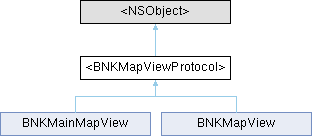
Instance Methods | |
| (void) | - setFixedLevelEnable: |
| (void) | - setFixedLevel: |
| (void) | - setIconsOfRouteType: |
| 路线上的图标 全部展示\隐藏 YES 是显示。NO是隐藏。默认展示全部。 | |
| (void) | - hideIconsOfRouteType: |
| (BOOL) | - setDIYRouteImageToMap:type:isShow: |
| (void) | - setNaviRouteHighLightHalfWidth:unHighLightHalfWidth:routeOverViewHalfWidth:routeACEHalfWidth: |
Properties | |
| id< BNKMapViewDelegate > | naviMapViewDelegate |
Method Documentation
◆ hideIconsOfRouteType:
| - (void) hideIconsOfRouteType: | (NSArray< NSNumber * > *) | types |
隐藏 路线上的图标 示例:NSArray<NSNumber *> *types = [(BNMIMapCarIconType_Camera), (BNMIMapCarIconType_Jam)]; [self.multiMapView hideRouteLabelsOfType:types];
◆ setDIYRouteImageToMap:type:isShow:
| - (BOOL) setDIYRouteImageToMap: | (UIImage *) | icon | |
| type: | (BNMIDIYRouteImageType) | type | |
| isShow: | (BOOL) | show |
设置路线颜色
- Parameters:
- icon: 图片
- type: BNMIDIYRouteImageType 类型
- show: YES使用自定图片。NO不适用自定义图片
◆ setFixedLevel:
| - (void) setFixedLevel: | (CGFloat) | level |
设置固定比例尺等级。 注:进了车道级之后,设置的固定比例尺不生效,当退出车道级后会还原成设置的固定比例尺。
- Parameters
-
level 固定比例尺等级,取值范围为 4~21。此参数仅在通过 - setFixedLevelEnable: 接口启用固定比例尺功能(enable 为 YES)时生效。
◆ setFixedLevelEnable:
| - (void) setFixedLevelEnable: | (BOOL) | enable |
设置固定比例尺开关。
- Parameters
-
enable YES 表示启用固定比例尺功能,此时 - setFixedLevel: 接口中设置的比例尺等级(level 参数)将生效; NO 表示关闭固定比例尺功能,系统会使用默认比例尺大小。默认值为 NO。
◆ setNaviRouteHighLightHalfWidth:unHighLightHalfWidth:routeOverViewHalfWidth:routeACEHalfWidth:
| - (void) setNaviRouteHighLightHalfWidth: | (CGFloat) | highWidth | |
| unHighLightHalfWidth: | (CGFloat) | unHighLightWidth | |
| routeOverViewHalfWidth: | (CGFloat) | routeOverWidth | |
| routeACEHalfWidth: | (CGFloat) | routeACEWidth |
导航路线宽度设置。 设置的时候需要4个一起设置。如需要单独设置某一个宽度,其他需传入对应默认值。
- Parameters:
- highWidth: 高亮路线宽度 默认:19.0f; 不能小于等于0.
- unHighLightWidth: 非高亮路线宽度 默认:14.0f; 不能小于等于0.
- routeOverWidth: 全览路线宽度 默认:14.0f; 不能小于等于0.
- routeACEWidth: ACE路线宽度 默认:21.0f; 不能小于等于0.
The documentation for this protocol was generated from the following file: